HistropediaJS v1.3.0 - Time Bands, Article layouts, event handlers and more
By Navino Evans
HistropediaJS 1.3.0 (4 Dec 2025) is a big quality-of-life release: no external dependencies, HiDPI-ready rendering, pluggable article card layouts, and a range of APIs that make timelines easier to customise, observe, and secure. Below are the changes we think are worth adopting right away, with examples you can drop into your embeds.
Time Bands: contextual eras on the canvas
Time Bands let you paint eras behind your articles (think “Bronze Age”, “Cold War”, or “Company IPOs”). They share the same date precision model as articles, reserve their own space, and can be styled or toggled at runtime.
import { Timeline, PRECISION_DECADE } from 'histropediajs';

const timeline = new Timeline(container, {
  timeBand: {
    reserveSpace: true,
    reserveSpacePixels: 24,
    area: { up: 'edge', down: 'edge' }, // stretch behind the whole timeline
    defaultStyle: {
      border: { color: '#c0c0c0', width: 2 },
      text: { color: '#0ea5e9', align: 'center', font: '600 16px Calibri' },
    },
    // preload bands via options.timeBand.data
    data: [
      {
        id: 1,
        title: 'Industrial Revolution',
        from: { year: 1760 },
        to: { year: 1840, precision: PRECISION_DECADE },
        style: { backgroundColor: 'rgba(14, 165, 233, 0.12)' }, // band-specific color
      },
      {
        id: 2,
        title: 'Digital Age',
        from: { year: 1970, precision: PRECISION_DECADE },
        isToPresent: true,
        style: { backgroundColor: 'rgba(34, 197, 94, 0.14)' }, // different color per band
      },
    ],
  },
});

// Or load bands at runtime (same schema)
timeline.loadTimeBands([
  { id: 3, title: 'Space Race', from: { year: 1957 }, to: { year: 1975 }, style: { backgroundColor: 'rgba(234, 179, 8, 0.14)' } },
]);

// Tip: adjust timeBand.area to move bands closer/further from the main line
// area: { up: 'edge', down: 40 } // up can be "edge" to span the full canvas height above the line
Try the Time Bands example for live settings with copyable snippets.
Pluggable Article Card layouts (hello, landscape)
The rendering of “Cards” representing articles on your timeline can now be changed to different layouts. Each layout is like a completely different rendering template for how the article is drawn on the timeline, still customisable with the full range of style options. The new built-in landscape layout draws event cards with a landscape orientation — ideal for timelines with limited height. The standard layout from previous versions remains the default, and has been named the portrait layout. Many more layouts are on the way soon, including image-only, circular, minimised, and more.
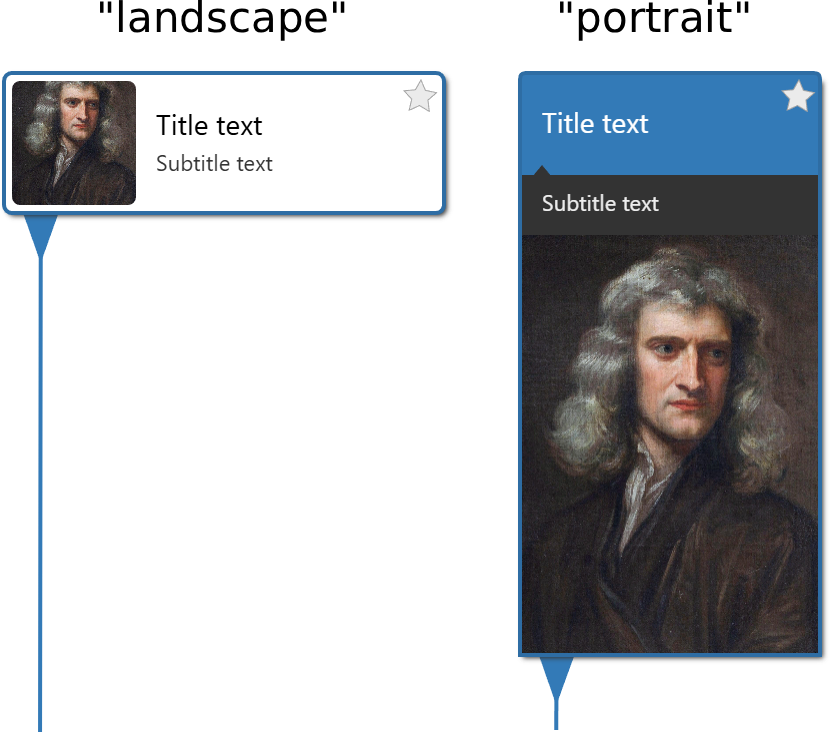
Layouts can be set for the whole timeline, and overridden for individual articles.
There are also layout-specific style overrides that make it easy to add style settings that only apply to a specific layout — especially useful if you switch between them dynamically (e.g. on device orientation change).
You can also register your own layout for complete control over rendering. Full instructions will be published very soon, but contact [email protected] if you want help setting this up, with code examples.
import { Timeline } from 'histropediajs';

// Pick the built-in landscape layout and tweak its look
const timeline = new Timeline(container, {
  article: {
    defaultCardLayout: 'landscape',
    layoutStyles: {
      landscape: {
        style: {
          width: 220,
          image: { shape: 'circle', margin: 10 }
        },
        hoverStyle: {
          border: { color: '#a6c6e2' }
        },
      },
    },
  },
});
You can also use different layouts to highlight key events.
Unified event handling with 18 new events
Hooking up behaviour when an article is clicked works the same as before, but there’s now a unified event system with many more events to observe. Register handlers via options.on or timeline.on, and remove them with .off.
Events are organised into four categories:
- Timeline:
timeline-click,timeline-dblclick,timeline-render-start,timeline-render-end,timeline-state-change - Article:
article-pointerenter,article-pointermove,article-pointerleave,article-click,article-dblclick,article-drag-start,article-drag,article-drag-end,article-select - Zoom:
zoom,zoom-wheel,zoom-pinch-start,zoom-pinch,zoom-pinch-end - Viewport:
viewport-drag-start,viewport-drag,viewport-drag-end
const timeline = new Timeline(container, {
  on: {
    'article-select': (article) => console.log('selected', article.title),
    'timeline-click': ({ position }) => console.log('background clicked at', position),
    'zoom-wheel': ({ centre, zoomDelta }, evt) => console.log('wheel', centre, zoomDelta),
  },
});

// Or after initialisation
const onDrag = (payload) => console.log('drag', payload.dx);
timeline.on('viewport-drag', onDrag);
// Later, detach listeners
timeline.off('viewport-drag', onDrag);
If you’re migrating from an earlier version, the legacy options (onArticleClick, onArticleDoubleClick, onSave) automatically re-route to their new equivalents (article-select, article-dblclick, timeline-state-change), with logged warnings if debug is enabled via Histropedia.enableDebug().
See the event handlers documentation for full details on each event and its payload.
HiDPI and rendering controls
Crisp, device-pixel-aware rendering is now active by default, with extreme DPRs capped to protect performance. Set dpr: 1 to revert to the same rendering as previous versions. Pair it with the new .setSize helper to keep embeds responsive.
const timeline = new Timeline(container, {
  width: 900,
  height: 500,
  canvas: { dpr: 'auto', maxDPR: 3 },
});

// Keep the canvas in sync with its container
const resize = () => timeline.setSize(container.clientWidth, container.clientHeight);
window.addEventListener('resize', resize);
resize();
See the canvas options reference for full details.
Image loader & sanitizer overhaul
The pipeline now queues intelligently, enforces a byte-budgeted cache, honors CORS when needed, sanitizes URLs before they ever hit the network, and prefers createImageBitmap where supported — making even large images usable with no noticeable performance hit (though of course it’s still best to supply an appropriate size where possible!). You can customise the cache size, number of concurrent downloads, preferred decoding method and much more via the new options.image settings.
Allow only specific hosts with the built-in sanitizer:
const timeline = new Timeline(container, {
  image: {
    sanitizer: {
      allowedOrigins: ['static.example-cdn.com', '*.imgix.net'],
    },
  },
});
Override the built-in sanitizer entirely while still receiving the configured options:
const timeline = new Timeline(container, {
  image: {
    customSanitizer: (url, options) => {
      const isAllowedHost = ['media.example.com', 'images.partner.net'].some((host) =>
        url.includes(host)
      );
      // you can also inspect options.sanitizer.allowedSchemes / allowedOrigins here
      return isAllowedHost ? url.trim() : null; // return null to block
    },
  },
});
See the image options reference for full details.
Smoother zoom and pointer controls
The pointer and zoom handling has been overhauled, with more configuration options and proper detection of smooth trackpad-style devices vs discrete mousewheels. The new auto wheel mode should be optimal for the vast majority of users, and you can tweak the different behaviour for trackpads with the proportionalGain setting, as well as proportionalExponent for the acceleration effect on sustained zoom actions.
See the zoom options reference for full details.
Article defaults, stars, and richer imagery
You can set baseline article data, toggle star badge visibility, and control event card image shape/margins.
import { Timeline, PRECISION_YEAR } from 'histropediajs';

const timeline = new Timeline(container, {
  article: {
    defaultData: { from: { precision: PRECISION_YEAR }, imageUrl: './no-image.png'},
    star: { visible: false },
    defaultStyle: {
      image: {
        shape: 'circle', // "natural" and "square" also supported
        borderRadius: 6
      }
    }
  },
});
This makes data ingestion cleaner since defaults handle missing fields automatically.
Debugging & logging toggles
There’s now a central logger plus helpers on the default export so you can turn diagnostics on/off without touching the bundle.
import Histropedia from 'histropediajs';

Histropedia.enableDebug();
Histropedia.Logger.setPrefix('[My Timeline]');

timeline.on('timeline-render-end', () => {
  Histropedia.Logger.debug('Frame rendered');
});
This gives you opt-in diagnostics during development without noisy consoles in production.
TypeScript coverage
v1.3.0 introduces type definitions across the whole library — from Timeline, Article, and Time Band options and methods, to event handlers and pointer payloads and much more.
TypeScript users get full type safety and intellisense across the whole API surface.
If you want to jump into the most essential changes, start with Time Bands and the landscape layout—they deliver the most visible upgrade with minimal code. From there, wire up the EventManager and logger for observability, and tighten your image/zoom settings to suit your audience.