Posts
HistropediaJS v1.4.0: timeline lanes, viewport fitting APIs and smoother navigation
Previous release: HistropediaJS v1.3.0
HistropediaJS 1.4.0 is centred around one major new capability: timeline lanes. You can now organise articles into separate horizontal lanes while keeping a single shared timeline axis.
That makes it much easier to build timelines for parallel tracks, categories, teams, projects, eras, or any dataset where you need to compare related sequences and spot connections across time.
This release also adds new viewport fitting APIs, momentum after pan gestures, smoother notched mouse-wheel zooming, responsive article spacing, low-height card layout breakpoints, and several fixes for click/touch handling and article rendering stability.
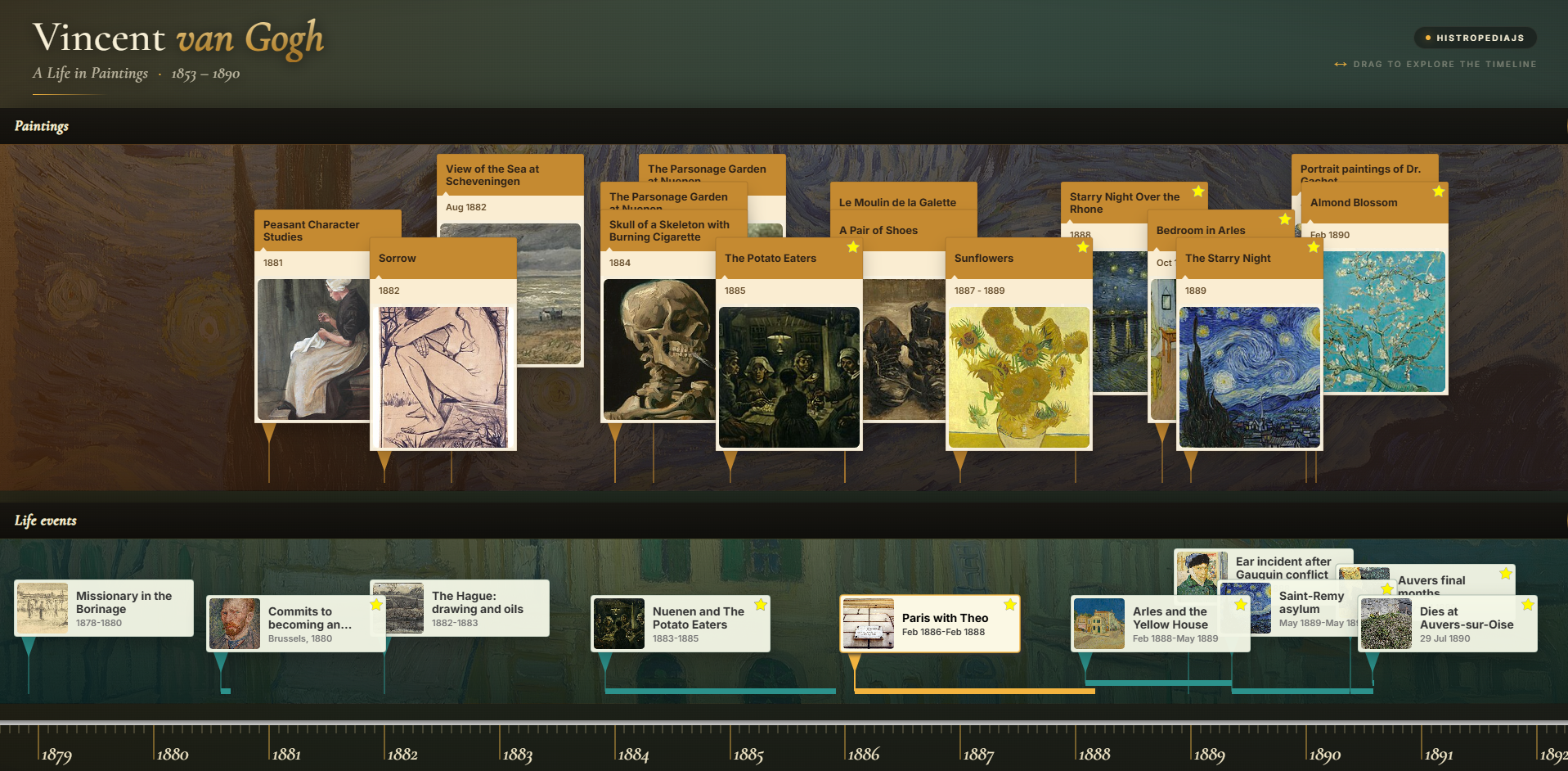
Timeline lanes: multiple rows, one shared axis
Lanes let you split articles into horizontal groups without giving up the familiar HistropediaJS pan, zoom, stacking, connectors, and period lines.
Articles still render on the main canvas, while lane headers and lane backgrounds are DOM elements underneath the canvas. That means you can style lane chrome with normal CSS while keeping timeline interaction and rendering on a single canvas.
import { Timeline } from 'histropediajs';

const timeline = new Timeline(container, {
  width: 1000,
  height: 560,
  lane: {
    data: [
      {
        id: 'people',
        title: 'People',
        layout: { heightWeight: 2 }
      },
      {
        id: 'projects',
        title: 'Projects',
        layout: { heightWeight: 1 }
      },
      {
        id: 'milestones',
        title: 'Milestones',
        layout: { heightWeight: 1 }
      },
    ],
  },
});

timeline.load([
  {
    id: 'ada-lovelace',
    lane: 'people',
    title: 'Ada Lovelace',
    from: { year: 1815, month: 12, day: 10 },
  },
  {
    id: 'analytical-engine',
    lane: 'projects',
    title: 'Analytical Engine',
    from: { year: 1837 },
  },
  {
    id: 'first-program',
    lane: 'milestones',
    title: 'First published computer program',
    from: { year: 1843 },
  },
]);
Articles are assigned to lanes using the lane key in the article data. If an article does not specify a lane, it falls back to options.lane.defaultId, which defaults to 'default'.
If an article references a lane id that has not been defined yet, HistropediaJS automatically creates the lane on demand (an “implicit” lane). You can still configure that lane later through the normal lane APIs, while explicit lane definitions let you provide titles, layout settings, styling hooks, visibility controls, and lane-specific article defaults upfront.
Here is a live demo of the new lanes feature, showing two horizontal lanes aligned to one shared axis:
See the Pen HistropediaJS - Simple timeline lanes demo by Navino Evans (@navino-evans) on CodePen.
You can also load a batch directly into a lane:
timeline.loadLaneArticles('projects', [
  { id: 'difference-engine', title: 'Difference Engine', from: { year: 1822 } },
  { id: 'tabulating-machine', title: 'Tabulating Machine', from: { year: 1890 } },
]);
CSS-first lane styling
Lane chrome is designed to work cleanly with your stylesheet. HistropediaJS writes the geometry needed to position lanes, but decorative inline styles are only written when you explicitly configure them through lane.defaultStyle, a lane’s style, or runtime lane.setStyle(...) calls.
Each lane gets predictable built-in classes:
histropedia-lanehistropedia-lane-index-Nhistropedia-lane-position-top,histropedia-lane-position-middle, orhistropedia-lane-position-bottomhistropedia-lane-headerhistropedia-lane-titlehistropedia-lane-body
Add your own classes globally or per lane:
const timeline = new Timeline(container, {
  lane: {
    defaultClassName: 'my-timeline-lane',
    defaultHeaderClassName: 'my-timeline-lane-header',
    defaultBodyClassName: 'my-timeline-lane-body',
    defaultTitleClassName: 'my-timeline-lane-title',
    data: [
      {
        id: 'people',
        title: 'People',
        className: 'lane-people',
        bodyClassName: 'lane-people-body',
      },
    ],
  },
});
Or configure inline lane styles when that is more convenient:
const timeline = new Timeline(container, {
  lane: {
    defaultStyle: {
      header: { backgroundColor: '#f8fafc' },
      body: {
        backgroundColor: 'rgba(14, 165, 233, 0.06)',
        borderColor: 'rgba(14, 165, 233, 0.25)',
        borderWidth: 1,
        borderRadius: 6,
      },
      title: {
        color: '#0f172a',
        font: '600 13px system-ui',
        textAlign: 'left',
      },
    },
  },
});
Lane-specific article defaults
Each lane can override a supported subset of the global options.article settings. This is useful when one lane needs compact landscape cards, another needs wider cards, or a dense lane needs tighter row spacing.
const timeline = new Timeline(container, {
  article: {
    defaultStyle: { width: 180 },
    defaultCardLayout: 'portrait',
  },
  lane: {
    data: [
      {
        id: 'people',
        title: 'People',
        article: {
          defaultCardLayout: 'landscape',
          defaultStyle: { width: 230 },
          autoStacking: { rowSpacing: 36 },
          periodLine: { thickness: 8 },
        },
      },
      {
        id: 'milestones',
        title: 'Milestones',
        article: {
          defaultStyle: { width: 160 },
          distanceToBaseline: { value: 120 },
        },
      },
    ],
  },
});
distanceToBaseline is the new name for the distance between article cards and the active baseline. In a single-lane timeline, that baseline is the shared axis. In a lane layout, it is the bottom of the article’s lane. The old article.distanceToMainLine option still works as a deprecated alias for backwards compatibility, including inside lane article overrides, but new code should use article.distanceToBaseline.value.
Lane visibility and reordering
Lanes are not just static groups. You can hide them, show them, rename them, restyle them, and reorder them at runtime.
const people = timeline.getLaneById('people');

people?.hide();
people?.show();
people?.setOption({ title: 'People & biographies' });
people?.setStyle('title.color', '#0c4a6e');

timeline.moveLaneToIndex('people', 0);      // nearest the shared axis
timeline.moveLaneAfter('projects', 'people');
people?.moveUp();                           // farther from the axis
people?.moveDown();                         // closer to the axis
Hidden lanes are excluded from lane layout, their lane DOM is hidden, and their articles are hidden while lane layout is active. Reordering uses the public lane order where index 0 is nearest the shared timeline axis.
Fit the viewport to dates and articles
v1.4.0 adds three viewport fitting helpers:
timeline.fitDateRange(start, end, options)timeline.fitArticleRange(article, options)timeline.fitArticles(options)
Use fitDateRange(...) when you know the date span you want the viewer to see. Year-only and month-only dates are treated as full periods for the fit calculation, so { year: 1945 } fits the whole year rather than treating it as a single instant.
timeline.fitDateRange(
  { year: 1961, month: 1 },
  { year: 1972, month: 12 },
  {
    padding: { left: 80, right: 80 },
    animation: { active: true },
  }
);
Use fitArticleRange(...) to focus on one article’s full period, or fitArticles(...) to fit the currently unfiltered article cards into the viewport.
const apollo = timeline.getArticleById('apollo-program');

if (apollo) {
  timeline.fitArticleRange(apollo, { padding: 80, animation: { active: true } });
}

timeline.fitArticles({ padding: 60, animation: { active: true } });
These helpers are especially useful with lanes because you can load a dataset, apply filters, then give users a one-click way to return to the active range.
Smoother pan and wheel zoom
Dragging the viewport can now continue with configurable momentum after release. It is on by default, and you can tune or disable it via options.pan.momentum.
const timeline = new Timeline(container, {
  pan: {
    momentum: {
      active: true,
      sampleWindow: 100,
      minVelocity: 0.01,
      stopVelocity: 0.005,
      friction: 0.005,
      maxDuration: 5600,
    },
  },
});
Notched mouse-wheel zoom now animates between steps by default, while preserving the cursor anchor. Repeated wheel input updates the target zoom so the motion continues smoothly instead of restarting from scratch.
const timeline = new Timeline(container, {
  zoom: {
    wheelStep: 0.2,
    discreteWheelAnimation: {
      active: true,
      duration: 250,
    },
  },
});
The default wheel step has increased from 0.1 to 0.2, so wheel zooming feels more responsive out of the box. If your application depends on the older slower feel, set zoom.wheelStep: 0.1.
Responsive card spacing and low-height layouts
The new responsive baseline settings make article card spacing adapt to the available lane height. This is enabled by default for lane layouts, with different defaults for portrait and landscape cards.
This helps lane layouts stay readable across different container heights, especially in embedded timelines where the available vertical space can vary.
const timeline = new Timeline(container, {
  article: {
    distanceToBaseline: {
      value: 350,
      responsive: {
        active: true,
        lanesOnly: true,
        byCardLayout: {
          portrait: { ratio: 0.6, min: 310, max: 410 },
          landscape: { ratio: 0.6, min: 100, max: 160 },
        },
      },
    },
  },
});
Card layout breakpoints can also switch low-height timelines to a more suitable layout. The default configuration switches to landscape below 320px height, which helps keep small embeds usable.
const timeline = new Timeline(container, {
  article: {
    defaultCardLayout: 'portrait',
    cardLayoutBreakpoints: [
      { maxHeight: 320, layout: 'landscape' },
    ],
  },
});
For rendering quality, article cards now default to device-pixel snapping. This keeps slow pans stable on high-density displays and avoids the small visual jitter that could appear around card internals and connector endpoints.
const timeline = new Timeline(container, {
  article: {
    rendering: {
      pixelSnap: 'device', // also supports 'css' and 'none'
    },
  },
});
Use device for crisp rendering, css when you want CSS-pixel alignment, or none if you prefer smoother subpixel motion over strict pixel alignment.
Public exports and package updates
TimeBand is now exported like the other main runtime classes. You can access it from the default export or import it directly:
import Histropedia, { TimeBand } from 'histropediajs';

console.log(Histropedia.TimeBand === TimeBand); // true
The package metadata and typings have also been tightened up for package consumers, including aligned entry points, and missing named export types.
Fixes worth noting
This release includes a number of interaction and compatibility fixes:
- false double-click detection has been tightened so
article-dblclickandtimeline-dblclickonly fire after two completed clicks on the same target - touch input that becomes a pinch no longer leaves pending click state behind
- legacy synthetic mouse events are suppressed where they could make a single tap register twice
article.activated()continues to work through a compatibility wrapper that triggersarticle-click- article hover states no longer activate when another DOM element is stacked above the timeline
- article and lane IDs are compared without implicit type coercion, so
1and"1"are treated as distinct IDs - boolean article opacity values are normalised to numeric values
- slow-pan article jitter has been reduced through shared snapped origins, aligned connectors, and card geometry snapping
If you are upgrading from v1.3.x, existing timelines will continue to work without lane configuration. To try lanes, start by adding lane ids to articles that naturally belong in separate categories or parallel tracks.
From there, you can gradually add lane titles, styling, layout settings, and lane-specific article defaults as needed.